Built for this How it works Who we are Get in touch
A different starting point

Built from the inside out.

Every architectural decision behind Iris is shaped by real use cases and years of experience working under the requirements of heavily regulated industries. We value the work of Motion Designers and Campaign Managers, because we know what's at stake.

The problem

Traditional CRM channels are limited.
Personalized video changes that.

Email, SMS, web, and ads have all been personalized for years. Video — the highest-engagement channel in the stack — never caught up. No platform was built to make it practical for regulated industries. Until now. Iris delivers interactive video that speaks directly to each viewer — and listens back when they respond.

Email Personalized ✓
SMS & Push Personalized ✓
Web & Ads Personalized ✓
Statements & Documents Personalized ✓
Video — highest engagement Still generic

Iris closes the gap — making video respond to individual data the way every other channel already does.

Advantage 01 · Cost

One template.
The cost doesn't multiply with your audience.

Traditional personalized video platforms render a unique video file for each viewer — on a server, using the viewer's data. The cost and data risk scales with volume. A campaign of one million viewers requires one million renders. Iris works differently.

Iris
One MotionPackage is built once and hosted on CDN
Every viewer downloads the same lightweight package
Data is injected in the viewer's browser at play time
No video file is ever generated, stored, or billed per viewer
Cost is flat — one package, unlimited recipients
×1
package delivered — regardless of audience size
Traditional render-farm platforms
Template is combined with data on a server
A unique video file is generated per viewer
Files are stored and delivered individually
Viewer data must leave your environment to reach the render server
Cost scales linearly with audience size
×N
renders for N viewers — every campaign
Advantage 02 · Security

Your customers' data never leaves their browser.

Iris serves the video template to the viewer's device. Your customer's information is injected directly from your servers into the video player, rendered locally, and never transmitted to Iris infrastructure.

Iris was built around a simple principle: client data never reaches our servers. This is a structural property of how the platform works.

No data processing agreement requiredIris is not a data processor for your customer PII. It never receives it.
No Iris systems in scope for data auditsWhat is in scope is your own system — entirely within your control.
A breach of Iris cannot expose your customer dataThat data was never present in Iris infrastructure.
Integration review is an iframe permissionOne CSP allowance. No SDK, no agent, no data egress to review.
Creative capability

Professional motion design.
No template constraints.

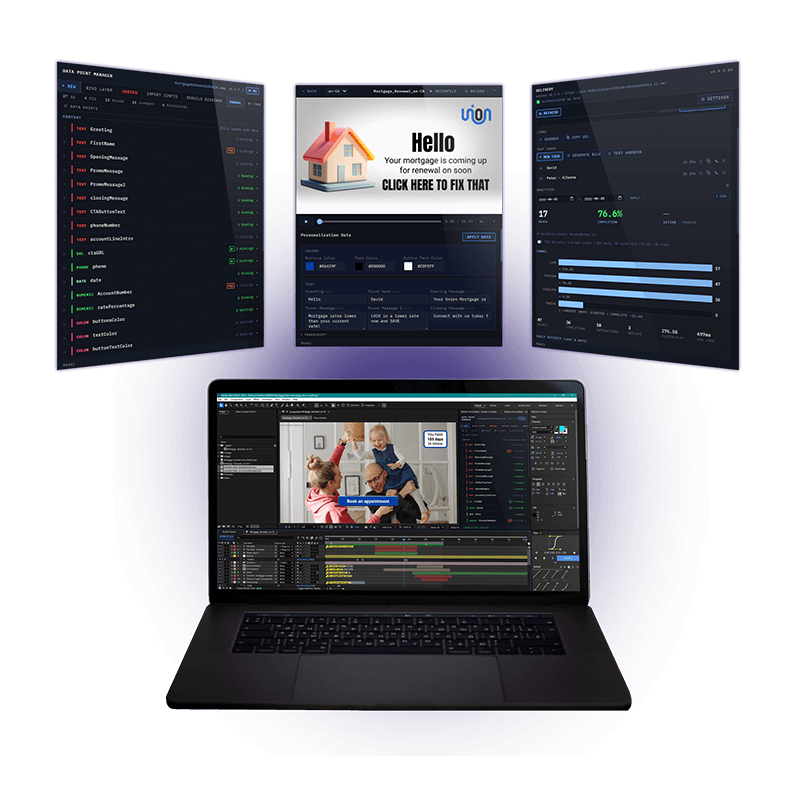
Most personalized video platforms produce outputs that look like data-filled templates — because that is what they are. Iris is different. Every video is authored inside Adobe After Effects, the professional standard for motion design.

Full animation fidelity

Keyframes, text animators, drop shadows, effects — all captured at export and reproduced with precision. What you build in After Effects is what the viewer sees.

No new tools for your design team

Designers work in their native environment. The Iris plugin lives inside After Effects. One click exports and publishes. No platform UI to learn, no creative decisions lost in translation.

Iterate without touching the pipeline

Update the After Effects composition, re-export, re-publish. The CDN URL and your integration code stay the same. Creative changes never require a developer.

AFTER EFFECTS Keyframes Effects Motion · brand · data fields One click export MOTIONPACKAGE Scene graph + assets No personal data · CDN-ready CDN Hi Sarah, balance: $48,240 Hi Carlos, renewal: Apr 15 Hi Marie, coverage: $500K Each renders their own data in their own browser UPDATE CYCLE Edit in AE → Re-publish Integration unchanged
Getting started

From brief to first video:
two to three weeks.

The timeline for a first deployment depends almost entirely on the creative work — how long it takes to build a template that reflects your brand and covers the use case you want to start with. The technical integration is typically the smallest part.

1
Days 1–3
Define the use case and data schema

Decide which customer touchpoint you want to start with — renewal notice, onboarding, policy statement, claims guidance. Define the data fields and confirm your system can supply them.

2
Week 1–2
Build and publish the template

A motion designer builds the video template in After Effects, binds the data fields using the Iris plugin, and publishes to the CDN as a draft. Your team reviews it with realistic test data before anything goes live.

One-click export and publish · sandbox preview with test cases
3
Week 2
Developer integration

Your developer adds the embed to the relevant page and connects your data source. For a portal integration this is typically a few hours. For an outbound campaign it includes a script to generate personalized links from your customer list.

Two HTML additions to the target page · no SDK or library required
4
Week 2–3
Review and promote to production

The package moves from draft through a review stage to production via the Iris Delivery panel. Every stage transition is recorded in an append-only audit log. Nothing reaches a production URL until it has been deliberately promoted there.

DRAFT → DEMO → PROD · explicit, recorded promotion
5
Ongoing
Campaign live. Analytics running.

Videos play for customers. Analytics capture plays, completions, and interactions in real time — no customer data included. When the template needs updating, the motion designer makes changes in After Effects and re-publishes. Your integration code stays the same.

Ready to see it with
your use case?

We work with a small number of organizations at a time — selected for fit, not volume. If the problem is familiar, let's talk about what a first deployment would look like for your team.